- Details
- Venue
- Agenda
- Requirements
- Logistics
- Booth
- Lead Retrieval
Event Details
Thank you for sponsoring Mission: Security’26. Your partnership helps make this event possible, and we look forward to hosting you for a day of meaningful conversations, industry insights, and valuable networking.

Venue
Parking Information
If you are staying at the hotel
Parking will be covered for overnight guests. Your room key will grant parking access and allow re-entry to the parking garage.
If you are NOT staying at the hotel
At event check-in, each attendee will receive one paid parking voucher.
Important details:
- You must keep your parking ticket
- Lost tickets cannot be replaced
- Parking vouchers do not allow re-entry
- If you leave the property, you will be responsible for paying for parking upon re-entry
Event Agenda
Below is the preliminary agenda for Mission:Security’26.
Final session details will be released closer to the event.
Sponsor Check-In & Setup | April 22, 2026 | Time: 5pm
Event Day | April 23, 2026
AM
AM
AM
PM
PM
PM
Sponsors must submit required materials for the event mobile app and breakout sessions.
All materials must be submitted no later than April 8, 2026.
Sponsors hosting breakout sessions must submit the following materials.
Required Materials
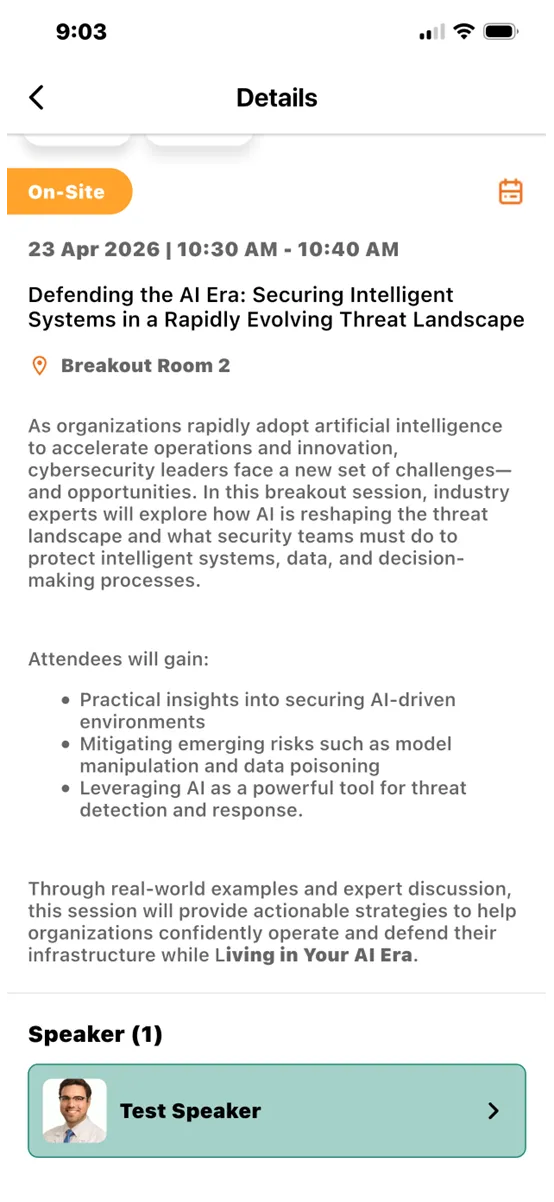
- Breakout Session Title
- Session Description / Summary
- Copy of the presentation
- Speaker information including:
- Name
- Title
- Company
- Short Bio
- Headshot
- LinkedIn URL
- Any customer handouts or documentation
Presentation Template
Please use the official Mission:Security presentation template.
Download Presentation Template
(PPTX download link: 21_MC26-Presentation_v1.pptx)
Session Info Example
Expo Hall Information
This section includes setup instructions, booth details, and event logistics for sponsors exhibiting in the expo hall.
(Due April 8, 2026)
Each sponsor will have a virtual booth profile in the event mobile app. This profile allows attendees to learn about your company and access resources.
Required Information
Please submit the following:
- Booth Admin Contact – First and Last Name (Must be registered and attending the event)
- Team Members
- List all team members attending your booth (All team members must be registered)
- Company Logo
- Size: 300 x 150 px
- Sponsor Links
- Company website
- Social media profiles
- Other relevant URLs
- Company Summary – 3–5 sentence company overview
Sponsors may include additional content to increase visibility within the mobile app.
Featured Video
- Used to highlight your booth in the app.
- Requirements:
- Format: MP4, MOV, WMV, AVI, or FLV
- Maximum size: 5 GB
- Include a video thumbnail
- Thumbnail Requirements:
- Format: JPG, PNG, or JPEG
- Ratio: 16:9
- Maximum size: 5 MB
Resources (Maximum of 3)
Examples include: Product overviews, 2-pagers, Sales collateral, and Whitepapers
Breakout Session Requirements
Sponsor Logistics
April 22, 2026 | Time: 5pm
Setup Instructions
Sponsors may unload materials at the main driveway entrance. Guest elevators are available for transporting materials.
The loading dock may also be used for unloading.
Important:
- Parking is not permitted at the loading dock
- The dock is strictly for loading and unloading
- The right side of the ballroom is closest to the loading dock (see event map)
Vendor & Sponsor Load-Out
April 23, 2026
5:00 PM
Sponsors may use the main driveway or loading dock for load-out.
Please ensure all materials are removed promptly following the event.
Sponsor Booth
Lead Retrieval
We are introducing a new lead retrieval process for Mission:Security’26.
To ensure sponsors understand the process, we will schedule a brief training session with Booth Admins prior to the event.
More details and meeting invitations will be sent soon.
Lead Retrieval (Badge Scanning) – Instructions for Exhibitors
Exhibitors can use the free lead retrieval feature to collect attendee information by scanning attendee badges during the event.
How It Works
- The system will automatically capture the attendee’s available information.
- Exhibitors can review the collected attendee details there.



Previous Event Photos & Gallery